
Okay, so you’ve launched a Google Ads campaign promoting what you sell.
Maybe it’s for your online shop, plumbing services, or even your Youtube channel.
But wouldn’t it be nice to test different versions and know what actually works?
That’s what Google Ads Experiments are for.
You can create a “copycat” version of your campaign and test different things.
And the neat part is that you can split both your original campaign and your experiment 50/50 so you know what’s actually working.
Google shows each variation of your ad to separate audiences.
Then, it tracks which version performs better at achieving your goals — whether it’s clicks, conversions, or something else.
Based on the results, you can kill off underperformers.
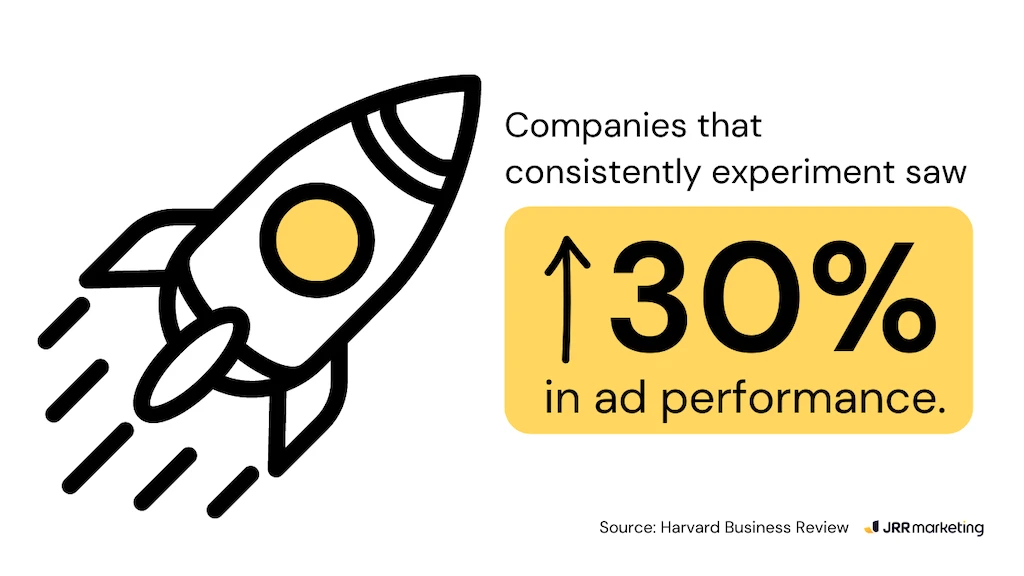
Ultimately leading to better response rates (up to 3x increase) and return on investment (ROI).
How to run a Google Ads Experiment? 7 steps to test your campaigns
You might have a great product, but your ad itself could… well, suck.
With Google Ads Experiments, you can tweak your campaigns and get more traffic, better CPCs, more leads, and more sales.
Here’s how you can test your hunches about what works into concrete evidence.
Step 1 – access Experiments
First things first, jump into your Google Ads account and log in.
Once you’re in, find the campaign you want to test something new with.
There’s a section called “Experiments” in those campaign settings.
Editor’s note: we’ve got a screenshot of the old view below, but you’ll see the same thing in the new view of Google Ads.
It might not be super obvious, but it should be somewhere in the sidebar.

Step 2 – Create a new experiment
To create a brand new experiment, look for a button with a plus sign and the words “New Experiment” next to it.
Clicking that will open up the settings for your test.

Step 3 – Choose the experiment type
Google Ads might offer different experiment types depending on the features available in your account.
Choose the type that tackles what you’re specifically trying to test or improve in your campaign.

Performance Max Experiment
This experiment type lets you see how your regular performance max campaign stacks up against another.
“Performance Max” campaigns use AI to show your ads across different platforms and formats (like Search, Display, and YouTube).
You run a test to see if the AI approach can bring in better results.
Basically, you’re letting Google’s AI manage your ads to see if it can outperform your work.
Demand Gen Experiment
This experiment type is built specifically for B2B (business-to-business) campaigns.
It lets you test different landing pages and messaging to see which attracts the best leads.
Think of it like this: you’re giving away a free guide on marketing automation tools.
You can create landing pages with different headlines and explanations — and it doesn’t need to cost an arm and a leg.
This experiment lets you see which one convinces more visitors to download the guide.
This way, you find which is more effective in attracting those interested in your offer — and might become potential customers.
Video Experiment
With this type, you can test different versions of the video itself – maybe a shorter one or a funnier intro.
You can also try out different thumbnail images to see which makes people click and watch.
Ultimately, you figure out what kind of video content keeps viewers engaged.
The “winning” variation is the one that convinces them to do what you want them to do after watching.

App Lift Experiment
If you’re promoting a mobile app, this experiment type is for you.
It lets you test different elements on your app store page, like the description and the screenshots.
By trying out different variations, you find which one makes people want to download your app the most.
Custom Experiment
This type basically allows you to test virtually any aspect of your campaigns.
Want to try out different bidding strategies?
Curious if targeting a slightly different audience brings better results?
A custom experiment lets you test it all.
Start simple with one variable at a time, like testing different keywords, for example.
Once you get comfortable (and have some data), you can graduate to more complex experiments.
Step 4 – Define your experiment
Pick the original campaign that you want to use as your starting point.
Think of it as the control group.
Then, Google Ads will create a copy of that campaign, kind of like a test lab, where you can make all your tweaks.
Go ahead and give it a catchy name and a short description so you can tell them apart easily.

Step 5 – Set up the variation
Navigate to the new campaign within the experiment settings.
Essentially, you can go ahead and set up the variations between the original campaign and the test campaign.

Step 6 – Set up the experiment duration and budget
Next, you need to decide how long the experiment will run for.
Think of it like a science experiment – you need to give it enough time to gather results.
You can set the duration, maybe 2 weeks (14 days) for example.

Finally, you get to decide how much money to spend on this test group compared to the original campaign.
A common approach is a 50/50 split, but you can adjust that.
This way, you can see how each campaign performs with a similar budget.

Step 7 – Launch and monitor
Once you’ve configured the experiment details, click the “Create” button to launch the experiment.
After letting it simmer for a while (usually a few weeks), it’s time to analyse and optimise.
Head back to Google Ads and check out the performance data for each ad variation.
You’ll see stuff like clicks, sales (conversions), and even how much it costs to get a new customer (cost-per-acquisition).
Don’t just look for a random jump in performance.
Look for statistically significant improvements.
Based on the data, you can pick the ad version that did the best and make it the main ad for your campaign.
You can stop running the experiment to avoid wasting your budget on variations that might not be performing well.
- Go to your campaign settings and find the “Experiments” section.
- Click the “End Now” button to stop the variations from being served.
- Alternatively, you can let the campaign run until the end date that you initially set.
Once you shut down your experiment using either method, that’s it.
You can either apply the changes (the new experimental campaign) or keep your old campaign running as it was.
You can’t go back and restart it later.
If the results spark some new ideas for testing, you can always create a whole new experiment from scratch.

Google Experiment ideas to try today
What exactly can you test?
Here are some ideas for the types of experiments you can run with Google Ads, based on what you want to improve.
To improve Click-Through Rate (CTR)
- Ad variations — play around with different titles, descriptions, and calls to action for your ads to see which ones grab the most attention and get clicks.
- Landing page optimisation – create different versions of the page people land on after clicking your ad (landing page) and see which one convinces them to convert (buy something, sign up, etc.)
- Keyword match types – experiment with different ways to match keywords to your ads (broad, phrase, exact) to see which ones bring in users most likely to click

To improve Conversion Rate
- Offer experiments — test different promotions or discounts in your ads and landing pages to see which ones make people want to buy or sign up
- Call to Action tweaks — test different calls to action on your landing page (like “Buy Now” or “Sign Up”) to see which ones get the most people to do what you want
- Audience testing – Test showing your ads to different groups of people (by age, interests, etc.) to see who’s most likely to convert

To reduce Cost-Per-Acquisition (CPA)
- Bid strategies – Experiment with different automatic bidding options Google Ads offers (like “Target CPA”) to see if they can lower your costs while still getting you sales
- Negative keywords – Add words or phrases people might search for that aren’t relevant to your business (negative keywords) to stop wasting money on clicks that won’t lead to sales
- Campaign budget – Test giving different amounts of money to different campaigns and see how it affects your overall results and cost efficiency
Why bother experimenting?
Running Google Ads Experiments helps you find out what REALLY works.
For example, they can help you identify which variations generate the most conversions at the lowest cost.
This directly impacts ROAS as you’re spending less per conversion.
When you take the time to tinker with your ad, you get more information about what target market clicks and buys more.
- Boost clicks and conversions
Experiments help you find the perfect variation for clicks and conversions. This helps you attract the right audience and boost your return on investment (ROI). - Optimise for your goals
They help you fine-tune your ads to achieve specific goals, especially if you religiously do your audits. This makes your marketing more laser-focused and efficient. - Stay fresh and stay ahead
Google Ads Experiments are great for adapting to changing trends. By constantly testing and refining your ads, you make sure they continue to grab attention. - Uncover hidden opportunities
Sometimes, the most impactful element of your ad might surprise you. A funny headline or a compelling image you overlooked could be the element that skyrockets your results.
Say goodbye to guessing games
With Google Ads Experiments, you get actionable data that you can use to refine your ad campaigns.
Remember though: don’t be fooled by a small, one-time spike in performance.
Look for statistically significant improvements to ensure your findings are reliable.
Patience is also a virtue.
Avoid making changes mid-experiment.
Resist the urge to tweak your ad variations because this can skew the results.
Experimentation is an ongoing process.
Keep testing different elements of your ads to continuously optimise your campaigns.
Don’t just test headlines – try different landing pages entirely.
See which layouts and content convert visitors into customers most effectively.
Can you reach a more specific audience who’s more likely to be interested in what you offer?
Try mixing up your targeting options.
You can also play around with different ad extensions.
Experiment with different callouts and site links to maximise their real estate on the search results page.
And, hey, if you ever feel like experiments are a bit much to tackle on your own, don’t worry.
I’m always here to answer your questions.